Portfolio · Homelab Project
Firewall Management Lab
— enterprise workflows at home-lab scale
A personal lab simulating a small enterprise network. I write and maintain firewall policy, investigate blocked traffic, and practice change-management and incident-response workflows exactly as they'd run in a production SOC — documented decisions, audit trail, and all.
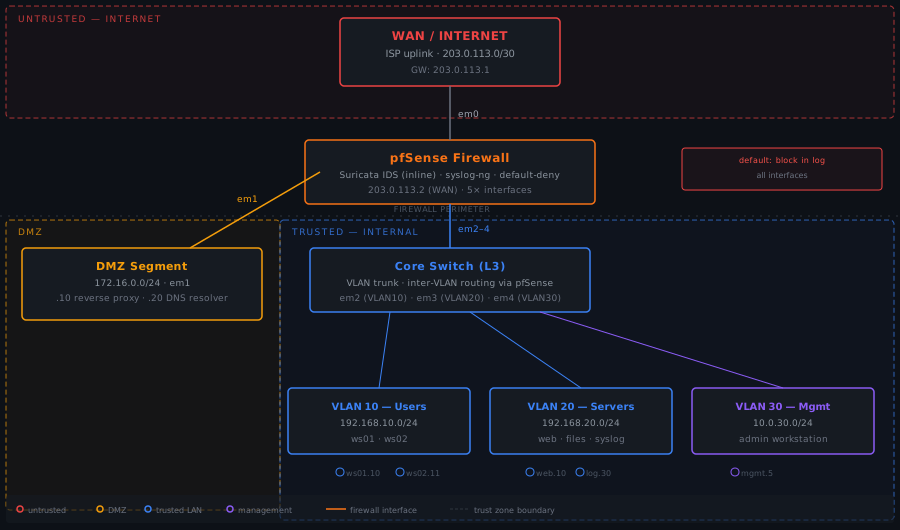
Network Topology
How the lab is wired.
Skills
What this demonstrates.
Architecture
Stack and addressing plan.
Stack
| Layer | Tool / Version |
|---|---|
| Firewall OS | pfSense CE 2.7.x |
| Packet filter | pf (FreeBSD) |
| IDS | Suricata 7.x — inline mode |
| Log collection | syslog-ng 4.x → flat files |
| Ruleset source | Emerging Threats Open |
| Analysis | tcpdump · pfctl · grep |
Addressing plan
| Segment | Subnet | Purpose |
|---|---|---|
| WAN / em0 | 203.0.113.0/30 | ISP uplink |
| DMZ / em1 | 172.16.0.0/24 | Perimeter services |
| VLAN 10 / em2 | 192.168.10.0/24 | User workstations |
| VLAN 20 / em3 | 192.168.20.0/24 | Internal servers |
| VLAN 30 / em4 | 10.0.30.0/24 | OOB management |
Trust model
Three trust zones, each enforced at the firewall interface. The default policy on every interface is
block in log all.
Every permitted flow requires an explicit rule with a change-request reference in its label.
Policy Artifacts
Example files from the policy/ directory.
# ============================================================
# VLAN 10 — Users (em2)
# Every rule carries a change-request label for log correlation
# ============================================================

# Users — internet web browsing
# CR-2026-006
pass in on em2 proto tcp from 192.168.10.0/24 to ! <rfc1918> port { 80, 443 } \
    keep state label "users-web-egress"

# Users — DNS to DMZ resolver
# CR-2026-007
pass in on em2 proto { tcp, udp } from 192.168.10.0/24 to 172.16.0.20 port 53 \
    keep state label "users-dns"

# Users — file server SMB
# CR-2026-009 — reviewed 2026-04-12, scope: port 445 only
pass in on em2 proto tcp from 192.168.10.0/24 to 192.168.20.20 port 445 \
    keep state label "users-to-fileserver-smb"

# Users — backup agent to backup server (explicit, named)
# CR-2026-016 — added post IR-2026-003; source-scoped to ws02
pass in on em2 proto tcp from 192.168.10.11 to <backup_srv> port 9443 \
    keep state label "users-backup-agent-explicit"

# Belt-and-suspenders: explicitly block SSH user→server for clear audit label
block in log on em2 proto tcp from <user_net> to <server_net> port 22 \
    label "users-no-ssh-to-servers"

# Block users from reaching management VLAN
block in log on em2 from <user_net> to <mgmt_net> label "users-no-mgmt"

# Default deny — every drop logged, label searchable in filter.log
block in log on em2 all label "users-default-deny"# Change Request — CR-YYYY-NNN
| Field | Value |
|-------------------|----------------------------------|
| CR ID | CR-YYYY-NNN |
| Requestor | |
| Date submitted | YYYY-MM-DD |
| Target window | YYYY-MM-DD HH:MM UTC |
| Priority | Low / Medium / High |
| Status | Draft / Approved / Implemented |
## 1. Description
<!-- What rule is being added/modified/removed, and why?
Be specific: interface, direction, protocol, source, destination, port. -->
## 4. Rule diff
```pf
# BEFORE (paste current rule, or "n/a — new rule")
# AFTER
```
## 5. Risk assessment
| Question | Answer |
|-------------------------------------|--------|
| If denied, what breaks? | |
| Increased attack surface? | |
| Destination host hardened? | |
| Compensating controls | |
## 7. Rollback plan
Revert within 5 minutes:
pfSense GUI → Diagnostics → Backup & Restore → prior config
## 8. Verification checklist
- [ ] Rule tested in maintenance window
- [ ] Label present in /var/log/filter.log
- [ ] No unexpected flows opened (pfctl -s state)
- [ ] Ruleset backed up before and after## Detection — T+0 — 02:11:08 UTC
Suricata fires: ET SCAN Potential SSH Scan OUTBOUND (SID 2001569)
Source: 192.168.10.11 → Targets: 192.168.20.10, .20, .30, port 22
Status: BLOCKED (label: users-default-deny)
## pfSense filter.log excerpt
May 14 02:11:08 pfsense filterlog: 5,,,1000000103,em2,match,block,in,4,
0x0,,127,51243,0,DF,6,tcp,60,192.168.10.11,192.168.20.10,52341,22,0,S,...
## Triage — T+5
pfctl -s state | grep "192.168.10.11.*22"
# (no output — no state established, all attempts blocked)
Severity downgraded to Low. No breach. Pattern consistent
with an application iterating a configured host list.
## Root cause — T+10
syslog-ng: Veeam Agent v6.2 (updated 2026-05-13) changed
backup transport from port 9443 to SSH port 22.
Misconfigured to probe all VLAN 20 hosts instead of only backup server.
## Resolution
- Corrected Veeam config: transport=managed, port=9443, target=.30 only
- Filed CR-2026-016: permit 192.168.10.11 → 192.168.20.30:9443
- Added explicit users-no-ssh-to-servers block rule for audit clarity
- Backup job verified clean at 03:14 UTC
Time to resolve: 65 min · Impact: zeroProcess
Change management workflow.
Every rule modification — add, edit, or remove — goes through the same four steps. Working alone, the process feels redundant. That's the point: the documentation habit doesn't exist for the current moment. It exists for six months from now.
Request
Fill out the change request template. Write the scope (interface, hosts, ports, direction), the justification, the risk assessment, and the rollback plan — before touching anything. The act of writing it often reveals the safer way to do what you're about to do.
Artefact: CR-YYYY-NNN document committed to the policy directory
Review
In production: second set of eyes. In this lab: minimum one hour between writing the CR and implementing it. Re-read the risk assessment with fresh eyes. The forced pause catches the thing you don't see when you're in the middle of configuring.
Gate: CR status moves from Draft → Approved
Implement
Back up the pfSense config before making any change. Apply the rule via pfSense GUI (which generates the pf.conf) or direct pf.conf edit. Update baseline.rules to reflect the new state of the ruleset.
Config backup: /cf/conf/backup/config-YYYY-MM-DD-pre-CRYYYYNNN.xml
Verify and close
Test the intended flow passes. Test that adjacent flows that should remain blocked still are. Confirm the rule label appears in /var/log/filter.log within two minutes. Mark the CR closed and document the verification results.
Gate: all checklist items confirmed, CR status → Closed
Incident Response
IR-2026-003 — blocked SSH scan, end to end.
02:11
Alert fires — Suricata SSH scan signature
Suricata inline engine fires ET SCAN Potential SSH Scan OUTBOUND (SID 2001569). Source 192.168.10.11 is probing three VLAN 20 hosts on port 22. pfSense is blocking all attempts — rule users-default-deny.
02:16
Triage — confirm no state established
Pull pfSense state table for source IP. No established sessions. All SYN-only, never completing a handshake. Severity drops to Low immediately.
Pattern (sequential host list, single port, predictable source-port increment) is consistent with a single application iterating a configured list — not a human operator.
02:21
Investigation — identify source process
Query syslog-ng for all events from ws02 in the prior 30 minutes. Find Veeam Agent log entries starting at 02:08 UTC — three minutes before the alert.
Root cause: Veeam Agent updated 2026-05-13. Update changed default transport from application port 9443 to SSH. Config not reviewed post-update. Agent probing the full server list instead of only the backup server.
02:31
Containment — confirm block, disable agent
Firewall was already blocking all attempts. No additional containment needed. Disabled the backup agent on ws02 temporarily to stop the noise while the config is corrected.
02:46
Eradication — fix agent config, scope target list
Corrected Veeam transport back to managed on port 9443. Scoped target list to only the backup server (192.168.20.30) — principle of least access applied to the backup job.
02:56
Recovery — file CR, add explicit rule, re-enable
Filed CR-2026-016: permit TCP from 192.168.10.11 to 192.168.20.30 port 9443. Added explicit users-no-ssh-to-servers block rule so future SSH-to-server drops appear in logs with a searchable label rather than the generic default-deny. Re-enabled agent. Backup job completed successfully at 03:14 UTC.
03:16
Closed — lessons learned documented
Post-update software reviews added to the change management checklist for any endpoint software that opens network connections. Alert resolved, no SLA breach, zero impact.
Full technical writeup
Covers goals, topology rationale, default-deny stance, ruleset structure, the full change management workflow, traffic analysis toolchain, IR phases, and what's next. Written for a SOC lead or network engineer audience.